

AI Integration: 7 Powerful Ways to Connect AI With Your Business Systems
AI can generate answers, summarize documents, classify information, and support decisions. But in a business environment, useful AI must do more than operate in isolation.
It needs to work with the systems, data, and processes that people already depend on.
That is where AI integration becomes important.
A company might have a capable AI model, a well-designed CRM, an ERP system, and several internal databases. If those systems cannot exchange information reliably, AI may remain a separate tool instead of becoming part of the business workflow.
The real opportunity is not simply adding AI. It is connecting AI to the right business processes, with appropriate permissions, reliable data, and clear boundaries.
This guide explores seven practical ways to approach AI integration with existing business systems without creating unnecessary complexity.
What Is AI Integration?
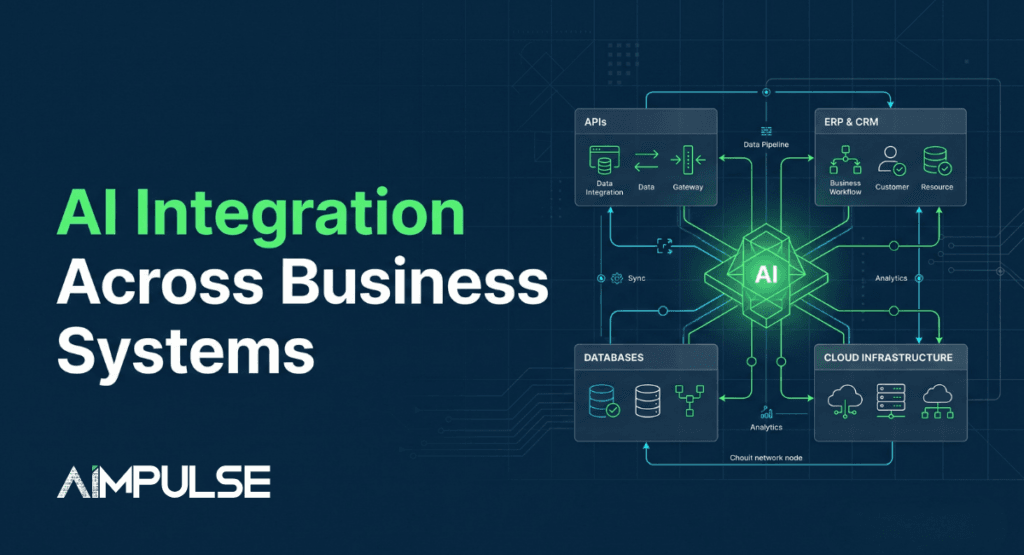
AI integration is the process of connecting artificial intelligence capabilities to existing applications, data sources, APIs, and business workflows.
Depending on the use case, this may involve connecting a language model to a document repository, enabling an AI assistant to retrieve CRM information, or using machine learning to classify incoming requests.
AI integration can include:
Connecting AI models through APIs
Retrieving information from internal databases
Integrating AI with CRM and ERP platforms
Automating document processing
Adding AI-powered search to business applications
Connecting AI to existing workflows
Implementing permissions, monitoring, and human approval
The right approach depends on the business problem. Not every workflow needs an AI agent, and not every AI feature requires a complex architecture.
As with broader AI product engineering, the aim is to create a reliable system around the model rather than treating the model as the entire product.
Why AI Integration Matters
Many businesses already use several digital systems. The challenge is that information can become fragmented between them.
Employees may copy data manually, switch between applications, repeat the same checks, or search through documents to answer routine questions.
AI can help reduce some of this friction, but only when it can access relevant information through reliable and appropriately controlled connections.
For organizations operating subscription-based applications, the same principles must fit the platform’s existing SaaS architecture, including its APIs and customer-access boundaries.
A useful AI implementation therefore connects three things:
Business context → AI capability → Business workflow
The result should be a measurable improvement in how work gets done, not simply another application for employees to manage.
7 Powerful Ways to Approach AI Integration
1. Start With One Business Problem
Before choosing a model or integration platform, identify the task you want to improve.
For example:
Finding information across internal documents
Classifying incoming customer requests
Summarizing support conversations
Extracting fields from business documents
Helping employees retrieve information from approved systems
Define the current process first. How long does it take? Where do errors occur? Which decisions require human judgment?
Then establish what a successful improvement would look like.
For an early product or proof of concept, the same focused approach used in AI MVP development can help validate one useful workflow before expanding the scope.
Choose the business outcome before choosing the AI technology.
2. Connect Existing Systems Through APIs
Application programming interfaces (APIs) allow software systems to exchange information in defined ways.
They are often a practical foundation for AI API integration because they create controlled interfaces between the AI-enabled application and other business systems.
For example, an AI-powered support tool might retrieve an order status from an e-commerce platform through an authorized API rather than relying on employees to copy information manually.
A well-designed integration should account for authentication, permissions, error handling, rate limits, and changing API contracts.
It should also consider whether information needs to flow in one direction or whether the workflow will update records in the source system.
Where APIs are unavailable, other integration methods may be appropriate, but they should be evaluated carefully for reliability and maintainability.
3. Give AI Access to the Right Data
An AI system is only useful when it can work with relevant, sufficiently reliable information.
However, connecting every available database is rarely the right starting point.
Identify the sources needed for the use case, then assess their quality, ownership, freshness, and access restrictions.
For knowledge-intensive applications, retrieval-augmented generation (RAG) can allow a model to retrieve relevant information from an approved knowledge base before generating an answer.
Microsoft’s guidance on designing and evaluating RAG solutions explains why retrieval quality and evaluation matter throughout the process.
RAG can improve grounding, but it does not guarantee correctness. Retrieval quality, document permissions, source freshness, and evaluation still matter.
This is especially important when an employee asks about a customer record that should not be visible outside an authorized team.
More data is not automatically better. Relevant, controlled data is better.
4. Keep Business Logic Outside the Model Where Appropriate
AI models can interpret language, extract information, and support decisions. They should not automatically replace the deterministic rules that a business relies on.
Consider a purchase approval workflow.
An AI system might extract details from an invoice or identify a potential discrepancy.
The actual approval limit, authorization rules, and payment controls should remain enforced by reliable application logic.
This separation makes the system easier to test and audit. It also reduces the risk of a generated answer being mistaken for an authorized business action.
Use AI for tasks that benefit from interpretation. Use explicit software rules for requirements that must be applied consistently.
5. Build Security and Permissions Into the Connection
An AI feature should not gain access to information simply because the application can technically retrieve it.
Permissions need to follow the user, the task, and the data involved.
Important controls include:
Authentication and authorization
Least-privilege access
Tenant and customer-data isolation
Protection of credentials and secrets
Input and output validation
Logging and monitoring
Appropriate handling of sensitive information
If an AI assistant can search internal documents, it should not reveal documents the requesting user is not allowed to access.
Security must be enforced by the surrounding system, not left to the model’s judgment.
A secure software development lifecycle (SSDLC) helps teams build these safeguards into delivery, while the OWASP Top 10 for LLM Applications highlights risks such as prompt injection and sensitive-information disclosure.
6. Add Human Approval to High-Impact Actions
Some AI integrations only provide information. Others may trigger actions, such as updating records, sending messages, or initiating transactions.
These uses require different levels of control.
A low-risk task, such as categorizing an internal support ticket, may be suitable for limited automation after testing.
A high-impact action, such as approving a payment or changing a customer contract, may require explicit human authorization.
Define which actions AI may perform independently, which require approval, and which should remain outside its authority.
Clear approval points also make responsibilities easier to explain to users and operations teams.
Automation should increase efficiency without removing necessary accountability.
7. Monitor the Integration After Launch
An AI integration is not finished when the feature works in a demonstration.
Production systems encounter changing data, API failures, unexpected inputs, evolving user behavior, and model updates.
Monitor the complete workflow, including:
API availability and latency
Failed requests and retries
Data freshness
Output quality
Human correction rates
Security events
Usage and infrastructure costs
Also create a process for investigating incidents and updating evaluations when requirements change.
The NIST AI Risk Management Framework offers useful principles for ongoing AI risk management.
A reliable integration should be observable, testable, and maintainable.
Common AI Integration Mistakes
Treating a Model as a Complete Solution
A model does not replace data engineering, application logic, access control, or operational monitoring.
Connecting Too Many Systems at Once
A large integration scope can make debugging and evaluation difficult.
Begin with the minimum set of systems needed to solve the target problem.
Ignoring Existing Architecture
An AI feature must fit the wider application, including authentication, APIs, databases, deployment, and support processes.
Automating Before Measuring
Without a baseline, it is difficult to determine whether the integration has improved the workflow.
Launching Without Evaluation
Test realistic scenarios, edge cases, failure modes, and unauthorized access attempts before expanding the rollout.
The AImpulse AI Integration Framework
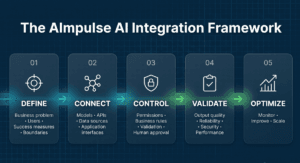
At AImpulse, we approach AI integration through five connected stages:
Define
Identify the business problem, users, success measures, and boundaries.
Connect
Select the appropriate models, APIs, data sources, and application interfaces.
Control
Implement permissions, business rules, validation, and human approval where needed.
Validate
Test output quality, reliability, security, and workflow performance.
Optimize
Monitor the system and improve it using real operational evidence.
DEFINE → CONNECT → CONTROL → VALIDATE → OPTIMIZE
The objective is to integrate AI into the business without compromising the reliability of the systems around it.
Frequently Asked Questions
What is AI integration?
AI integration connects AI capabilities to existing applications, data sources, APIs, and business processes so that AI can support real operational tasks.
Can AI integrate with existing business software?
Yes, where suitable interfaces and permissions are available. Integration may use APIs, data connectors, event-based systems, or other methods appropriate to the software and use case.
Does AI integration require replacing existing systems?
Not necessarily. Many projects extend existing systems. The best approach depends on their architecture, available interfaces, security requirements, and technical limitations.
Is AI integration secure?
It can be designed with strong security controls, but security is not automatic.
Authentication, authorization, data protection, logging, testing, and ongoing monitoring must be addressed.
How should a business start an AI integration project?
Start with a clearly defined business problem, assess the available data and systems, build a limited integration, evaluate it against measurable criteria, and expand only when the evidence supports it.
How AImpulse Helps
AImpulse helps businesses connect AI capabilities with the software, data, and workflows they already use.
Our work can include AI application development, API development and integration, enterprise software, workflow automation, and cloud-native architecture.
Explore our software development and AI integration capabilities to see how these services fit together.
We focus on the complete system: not just the model, but also the data, business logic, permissions, integrations, and operational controls required to make it useful.
AI should work with your business, not become another disconnected tool.
Final Thoughts
AI becomes more valuable when it can operate within the context of real business processes.
That requires more than choosing a model. It requires understanding the problem, connecting the right systems, controlling access, validating outputs, and monitoring performance.
The strongest AI integration is not necessarily the most complex.
It is the one that solves a real problem, fits the existing architecture, and can be operated reliably as the business grows.
Connect intelligently. Validate carefully. Scale with purpose.
Ready to connect AI with your existing systems? Contact AImpulse to discuss a secure, practical integration approach for your business.